VOD Streaming Statistics API
The VOD Streaming Statistics API, which is a versioned API, retrieves the latest statistics for your video on-demand (VODVideo On-Demand (VOD) allows the playback of content that was previously encoded and stored within our system. One use for VOD is to allow viewers to stream your content at any time.) content, such as:
- Number of new playback requests.
- Number of new playback sessions for which playback started.
- Number of errors (e.g., authentication failures).
- Latency statistics for manifest and ad requests.
Key information:
- The VOD Streaming Statistics API does not measure concurrent viewers. The statistics returned by this API are not affected by the length of time that a viewer streams your content.
- These statistics are aggregated over a three minute period.
- It may take up to three minutes for new playback session statistics to be available for retrieval via this API.
- These endpoints will continue to serve statistics for a 24 hour window that begins after the last viewer starts streaming your VOD content.
The following timeline shows new playback sessions for the Selling Widgets and Buying Widgets assets.
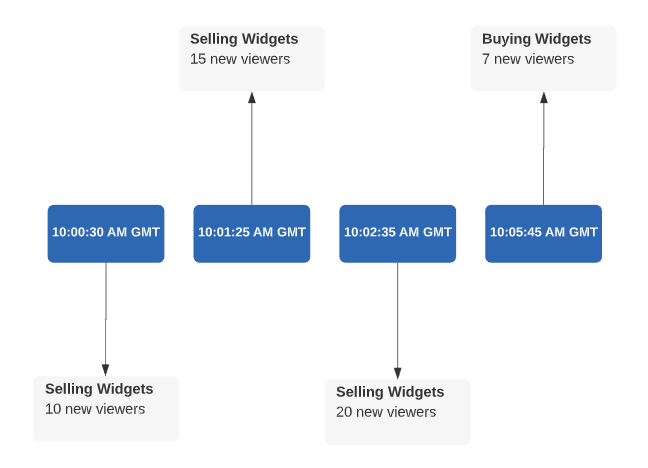
We will now examine the streaming statistics that will be available at different points in the above timeline.
| Timestamp | Available Streaming Statistics |
|---|---|
|
10:01:00 AM GMT |
Streaming statistics are not yet available. It typically takes three minutes before the system processes, logs, and makes the data available via this API. |
|
10:03:35 AM GMT |
This API can return streaming statistics for 10 playback sessions of Selling Widgets. Explanation: Although 35 new playback sessions were just initiated, the system hasn't logged them yet. Therefore, this API may only return statistics for the initial 10 playback sessions of Selling Widgets. |
|
10:04:25 AM GMT |
This API can return streaming statistics for 25 new playback sessions of Selling Widgets. Explanation: Although 20 playback sessions were initiated at 10:02:35 AM GMT, the system has only processed the sessions that were initiated prior to 10:01:25 AM GMT. As a result, this API may only return statistics for playback sessions that were initiated between 09:58:25 AM GMT and 10:01:25 AM GMT. The total number of eligible playback sessions that were initiated during that time period is 2510 + 15 = 25. |
|
10:10:15 AM GMT |
This API can return streaming statistics for all playback sessions of Selling Widgets and Buying Widgets. Explanation: The most recent playback session for Selling Widgets started at 10:02:35 AM GMT. This API may only return statistics for playback sessions of Selling Widgets that were initiated between 09:59:35 AM GMT and 10:02:35 AM GMT. The most recent playback session for Buying Widgets started at 10:05:45 AM GMT. This API may only return statistics for playback sessions of Buying Widgets that were initiated between 10:02:45 AM GMT and 10:05:45 AM GMT. |
Endpoints
Use the following endpoints to retrieve VOD streaming statistics:
| Endpoint | Description |
|---|---|
|
Get Latest Statistics - All Assets GET /monitoring/vod-stats
|
Retrieves the latest statistics for all of your assets. |
|
Get Latest Statistics - Multiple Assets GET /monitoring/vod-stats/search
|
Retrieves the latest statistics for multiple assets. |
|
Get Latest Statistics - Single Asset GET /monitoring/vod-stats/Asset ID
|
Retrieves the latest statistics for a single asset. |
|
GET /monitoring/vod-stats/owner-summary/User ID
|
Retrieves summarized statistics for all of your assets. |
Base URL
Use the following base URL:
Get Latest Statistics - All Assets
Retrieves streaming statistics for up to the top 100 of the most recently played assets.
Key information:
-
Streaming statistics for each asset are limited to the playback sessions that were initiated 3 minutes prior to the start of the most recent playback session.
- If new playback sessions were recently initiated for more than 100 assets, then only the assets with the most new playback sessions will be returned.
Request
Request syntax:
Query string parameters:
Filter the response by passing the following query string parameters:
|
Parameter |
Description |
|---|---|
|
Required |
Replace User ID with the user IDA user ID uniquely identifies a user account via an alpanumeric system-defined ID. corresponding to the CMS user that owns the assets for which statistics will be returned.  Where can I find my user ID? Where can I find my user ID?
|
|
Replace Count with the maximum number of recently played assets for which statistics will be returned. The response will be restricted to the specified number of assets with the most new playback sessions. |
Authentication
Pass a digital signature based off of msg.
Response
The response for a successful request contains the following properties:
| Name |
Data Type |
Description |
|---|---|---|
|
@id |
String |
Indicates the relative path to this endpoint. |
|
@type |
String |
Returns Collection. |
|
List |
Contains VOD streaming statistics. |
|
|
total_items |
Integer |
Indicates the total number of assets for which streaming statistics were reported. |
items List
The items list describes each asset's streaming statistics using the following properties:
| Name |
Data Type |
Description |
|---|---|---|
|
@id |
String |
Indicates the relative path to an endpoint that returns streaming statistics for an asset. |
|
@type |
String |
Returns VodStats. |
|
id |
String |
Identifies an asset by its system-defined ID. |
|
Dictionary |
Provides statistics for the asset identified by the id property. Statistics are measured over 3 minutes prior to the time identified by the ts and ts_iso properties. |
|
|
ts |
Integer |
Indicates the Unix time, in milliseconds, at which the statistics for this asset were gathered. |
|
ts_iso |
String |
Indicates the date and time (UTC) at which statistics for this asset were gathered. Syntax: YYYY-MM-DDThh:mm:ss.ssssssZ
Example: 2024-01-08T20:31:11.510000Z
|
Sample Request/Response
Call the get_latest_stats_all_assets module (Python 3) to retrieve the latest statistics for your assets. This module imports names from the api_auth module.
import json
import requests
from api_auth import APICredentials, APIParams

class GetLatestStatsAllAssets:
    def __init__(self):
        self.host = "https://services.uplynk.com"

    def run(self):
        """
        Get the latest statistics for your assets.
        """
        self._get_latest_stats_all_assets()

    def _get_latest_stats_all_assets(self):
        user_id = "1234567890abcdefghijklmnopqrstu" # Replace with your user ID.
        url = "{}{}{}".format(self.host, "/api/v4/monitoring/vod-stats?owner=", user_id)

        response = requests.get(
            url, params=APIParams(APICredentials()).get_params({})
        )

        if response.status_code == 200:
            print(response.json())
        else:
            print(response.status_code)

GetLatestStatsAllAssets().run()
Response:
{
	'@id': '/api/v4/monitoring/vod-stats?owner=1234567890abcdefghijklmnopqrstu',
	'@type': 'Collection',
	'items': [{
			'@id': '/api/v4/monitoring/vod-stats/1f8a9d519d7545c183a76f07a0163410',
			'@type': 'VODStats',
			'id': '1f8a9d519d7545c183a76f07a0163410',
			'stats': {
				'type': 'vod',
				'errors': {},
				'latency': {
					'manifest': {
						'mean_ms': 0.0427,
						'min_ms': 0.0427,
						'max_ms': 0.0427
					},
					'ad': {
						'mean_ms': 1.44,
						'min_ms': 1.44,
						'max_ms': 1.44
					}
				},
				'version': 1,
				'sessions': {
					'ad': 1,
					'new': 1,
					'manifest': 1,
					'requests': 1
				}
			},
			'ts': 1606848860724,
			'ts_iso': '2020-12-01T18:54:20.724Z'
		}, {
			'@id': '/api/v4/monitoring/vod-stats/zf83d56727694fd7b7ba7112a8dc3042',
			'@type': 'VODStats',
			'id': 'zf83d56727694fd7b7ba7112a8dc3042',
			'stats': {
				'type': 'vod',
				'errors': {},
				'latency': {
					'manifest': {
						'max_ms': 0.063,
						'min_ms': 0.063,
						'mean_ms': 0.063
					}
				},
				'version': 1,
				'sessions': {
					'ad': 0,
					'new': 1,
					'manifest': 1,
					'requests': 1
				}
			},
			'ts': 1606779970682,
			'ts_iso': '2020-11-30T23:46:10.682Z'
		}
	],
	'total_items': 0
}
Get Latest Statistics - Multiple Assets
Retrieves the latest statistics for all of the assets defined in the asset_ids request body property.
Request
Request syntax:
Request body:
| Property |
Data Type |
Description |
|---|---|---|
|
asset_ids Required |
List of string values |
Defines the set of assets for which statistics will be returned. Identify each asset by its system-defined ID. Where can I find an asset ID?
|
Authentication
Pass a digital signature based off of msg.
Response
The response for a successful request contains the following properties:
| Name |
Data Type |
Description |
|---|---|---|
|
@id |
String |
Indicates the relative path to this endpoint. |
|
@type |
String |
Returns Collection. |
|
List |
Contains VOD streaming statistics. |
|
|
total_items |
Integer |
Indicates the total number of assets for which streaming statistics were reported. |
items List
The items list describes each asset's streaming statistics using the following properties:
| Name |
Data Type |
Description |
|---|---|---|
|
@id |
String |
Indicates the relative path to an endpoint that returns streaming statistics for an asset. |
|
@type |
String |
Returns VodStats. |
|
id |
String |
Identifies an asset by its system-defined ID. |
|
Dictionary |
Provides statistics for the asset identified by the id property. Statistics are measured over 3 minutes prior to the time identified by the ts and ts_iso properties. |
|
|
ts |
Integer |
Indicates the Unix time, in milliseconds, at which the statistics for this asset were gathered. |
|
ts_iso |
String |
Indicates the date and time (UTC) at which statistics for this asset were gathered. Syntax: YYYY-MM-DDThh:mm:ss.ssssssZ
Example: 2024-01-08T20:31:11.510000Z
|
Sample Request/Response
Call the get_latest_stats_multiple_assets module (Python 3) to retrieve the latest statistics for two specific assets. This module imports names from the api_auth module.
import json
import requests
from api_auth import APICredentials, APIParams

class GetLatestStatsMultipleAssets:
    def __init__(self):
        self.host = "https://services.uplynk.com"

    def run(self):
        """
        Get the latest statistics for the specified assets.
        """
        self._get_latest_stats_multiple_assets()

    def _get_latest_stats_multiple_assets(self):
        url = "{}{}".format(self.host, "/api/v4/monitoring/vod-stats/search")

        # Replace with the desired asset IDs.
        asset_ids = ['114n9q6a847ieldd8bb8dbf67afef96b', 'k30y636fa2f143eb95c7a41d96d581c4']

        headers = {'Content-Type': 'application/json'}

        response = requests.post(
            url, params=APIParams(APICredentials()).get_params({}), json={"asset_ids": asset_ids}, headers=headers
        )

        if response.status_code == 200:
            print(response.json())
        else:
            print(response.status_code)

GetLatestStatsMultipleAssets().run()
Response:
{
	'@id': '/api/v4/monitoring/vod-stats?owner=1234567890abcdefghijklmnopqrstu',
	'@type': 'Collection',
	'items': [{
			'@id': '/api/v4/monitoring/vod-stats/1f8a9d519d7545c183a76f07a0163410',
			'@type': 'VODStats',
			'id': '1f8a9d519d7545c183a76f07a0163410',
			'stats': {
				'type': 'vod',
				'errors': {},
				'latency': {
					'manifest': {
						'mean_ms': 0.0427,
						'min_ms': 0.0427,
						'max_ms': 0.0427
					},
					'ad': {
						'mean_ms': 1.44,
						'min_ms': 1.44,
						'max_ms': 1.44
					}
				},
				'version': 1,
				'sessions': {
					'ad': 0,
					'new': 1,
					'manifest': 1,
					'requests': 1
				}
			},
			'ts': 1606848860724,
			'ts_iso': '2020-12-01T18:54:20.724Z'
		}, {
			'@id': '/api/v4/monitoring/vod-stats/zf83d56727694fd7b7ba7112a8dc3042',
			'@type': 'VODStats',
			'id': 'zf83d56727694fd7b7ba7112a8dc3042',
			'stats': {
				'type': 'vod',
				'errors': {},
				'latency': {
					'manifest': {
						'max_ms': 0.063,
						'min_ms': 0.063,
						'mean_ms': 0.063
					}
				},
				'version': 1,
				'sessions': {
					'ad': 0,
					'new': 1,
					'manifest': 1,
					'requests': 1
				}
			},
			'ts': 1606779970682,
			'ts_iso': '2020-11-30T23:46:10.682Z'
		}
	],
	'total_items': 0
}
Get Latest Statistics - Single Asset
Retrieves the latest statistics for an asset provided that it has viewership. Identify an asset by its system-defined ID.
Where can I find an asset ID?
- Navigate to the CMS library by clicking the Content tab.
- Select the desired asset.
- The asset ID corresponding to the asset selected in the previous step is listed under the GUID label.

Request
Request syntax:
Authentication
Pass a digital signature based off of msg.
Response
The response for a successful request contains the following properties:
| Name |
Data Type |
Description |
|---|---|---|
|
@id |
String |
Indicates the relative path to an endpoint that returns streaming statistics for an asset. |
|
@type |
String |
Returns VodStats. |
|
id |
String |
Identifies an asset by its system-defined ID. |
|
Dictionary |
Provides statistics for the asset identified by the id property. Statistics are measured over 3 minutes prior to the time identified by the ts and ts_iso properties. |
|
|
ts |
Integer |
Indicates the Unix time, in milliseconds, at which the statistics for this asset were gathered. |
|
ts_iso |
String |
Indicates the date and time (UTC) at which statistics for this asset were gathered. Syntax: YYYY-MM-DDThh:mm:ss.ssssssZ
Example: 2024-01-08T20:31:11.510000Z
|
Sample Request/Response
Call the get_latest_stats_single_asset module (Python 3) to retrieve the latest statistics for an asset whose system-defined ID is 7771125f336c4e229c20f7307f8c3122. This module imports names from the api_auth module.
import json
import requests
from api_auth import APICredentials, APIParams

class GetLatestStatsSingleAsset:
    def __init__(self):
        self.host = "https://services.uplynk.com"

    def run(self):
        """
        Get the latest statistics for a single asset.
        """
        self._get_latest_stats_single_asset()

    def _get_latest_stats_single_asset(self):
        asset_id = "7771125f336c4e229c20f7307f8c3122" # Replace with the desired asset ID.
        url = "{}{}{}".format(self.host, "/api/v4/monitoring/vod-stats/", asset_id)

        response = requests.get(
            url, params=APIParams(APICredentials()).get_params({})
        )

        if response.status_code == 200:
            print(response.json())
        else:
            print(response.status_code)

GetLatestStatsSingleAsset().run()
Response:
{
	'@id': '/api/v4/monitoring/vod-stats/7771125f336c4e229c20f7307f8c3122',
	'@type': 'VODStats',
	'id': '7771125f336c4e229c20f7307f8c3122',
	'stats': {
		'type': 'vod',
		'errors': {},
		'latency': {
			'manifest': {
				'max_ms': 0.179,
				'min_ms': 0.118,
				'mean_ms': 0.138
			},
			'ad': {
				'mean_ms': 3.44,
				'min_ms': 0.44,
				'max_ms': 4.44
			}
		},
		'version': 1,
		'sessions': {
			'ad': 30,
			'new': 252,
			'manifest': 252,
			'requests': 252
		}
	},
	'ts': 1606776550557,
	'ts_iso': '2020-11-30T22:49:10.557Z'
}
Get Statistics Summary
Retrieves statistics for all new VOD playback sessions that were initiated within the last three minutes.
Request
Request syntax:
Replace the User ID with the user IDA user ID uniquely identifies a user account via an alpanumeric system-defined ID. corresponding to the CMS user that owns the assets for which statistics will be returned.
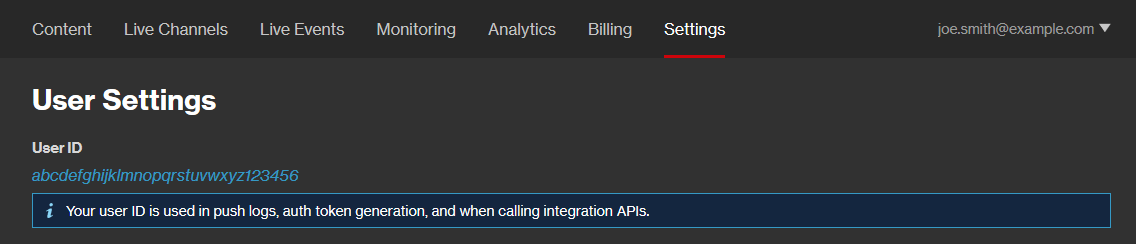
Where can I find my user ID?
- Load the User Settings page. How?
- Your user ID is listed under the User ID label.
Authentication
Pass a digital signature based off of msg.
Response
The response for a successful request contains the following properties:
| Name |
Data Type |
Description |
|---|---|---|
|
@id |
String |
Indicates the relative path to this endpoint. |
|
@type |
String |
Returns VodStatsSummary. |
|
Dictionary |
Contains statistics for new VOD playback sessions. |
|
|
owner |
String |
Identifies a CMS user by user IDA user ID uniquely identifies a user account via an alpanumeric system-defined ID.. |
|
ts |
Integer |
Indicates the Unix time, in milliseconds, at which the statistics were gathered. |
|
ts_iso |
String |
Indicates the date and time (UTC) at which statistics were gathered. Syntax: YYYY-MM-DDThh:mm:ss.ssssssZ
Example: 2024-01-08T20:31:11.510000Z
|
Sample Request/Response
Call the get_stats_summary module (Python 3) to retrieve summarized statistics. This module imports names from the api_auth module.
import json
import requests
from api_auth import APICredentials, APIParams

class GetSummaryStats:
    def __init__(self):
        self.host = "https://services.uplynk.com"

    def run(self):
        """
        Get summarized statistics for your assets.
        """
        self._get_summary_stats()

    def _get_summary_stats(self):
        user_id = "1234567890abcdefghijklmnopqrstu" # Replace with your user ID.
        url = "{}{}{}".format(self.host, "/api/v4/monitoring/vod-stats/owner-summary/", user_id)

        response = requests.get(
            url, params=APIParams(APICredentials()).get_params({})
        )

        if response.status_code == 200:
            print(response.json())
        else:
            print(response.status_code)

GetSummaryStats().run()
Response:
{
	'@id': '/api/v4/monitoring/vod-stats/owner-summary/1234567890abcdefghijklmnopqrstu',
	'@type': 'VodStatsSummary',
	'owner': '1234567890abcdefghijklmnopqrstu',
	'stats': {
		'type': 'vod',
		'sessions': {
			'requests': 225,
			'new': 225,
			'ad': 25,
			'manifest': 225
		},
		'latency': {
			'manifest': {
				'mean_ms': 0.016050000000000002,
				'min_ms': 0.016,
				'max_ms': 0.0161
			},
			'ad': {
				'mean_ms': 1.44,
				'min_ms': 1.12,
				'max_ms': 2.46
			}
		},
		'errors': {},
		'version': 1
	},
	'ts': 1616793717331,
	'ts_iso': '2021-03-26T21:21:57.331Z'
}
stats Dictionary
The stats dictionary provides streaming statistics for an asset via the following properties:
| Name |
Data Type |
Description |
|---|---|---|
|
errors |
Object |
Contains key-value pairs for each type of error. Syntax: Error Code: # of Playback Sessions
Example: The following key-value pair indicates that 10 playback sessions had an invalid expiration format: 101:10
View error codes.
Error codes are defined below.
|
|
latency |
Dictionary |
Contains latency statistics for new playback sessions. These statistics are described through the following properties:
Use these statistics to troubleshoot slow playback load times. |
|
Dictionary |
Contains statistics for new playback sessions. |
|
|
type |
String |
Returns vod. |
|
version |
Integer |
Reserved for future use. |
ad Dictionary
The ad dictionary provides statistics for the retrieval of all ads from third-party ad servers via the following properties:
| Name |
Data Type |
Description |
|---|---|---|
|
mean_ms |
Decimal |
Indicates the average latency, in milliseconds, for ad retrieval. |
|
min_ms |
Decimal |
Indicates the lowest amount of latency, in milliseconds, for ad retrieval. |
|
max_ms |
Decimal |
Indicates the highest amount of latency, in milliseconds, for ad retrieval. |
manifest Dictionary
The manifest dictionary provides statistics that describe how long it took to prepare the playlist and then load the manifest via the following properties:
| Name |
Data Type |
Description |
|---|---|---|
|
mean_ms |
Decimal |
Indicates the average latency, in milliseconds, for a manifest request. |
|
min_ms |
Decimal |
Indicates the lowest amount of latency, in milliseconds, for a manifest request. |
|
max_ms |
Decimal |
Indicates the highest amount of latency, in milliseconds, for a manifest request. |
sessions Dictionary
The sessions dictionary provides statistics for playback sessions via the following properties:
| Name |
Data Type |
Description |
|---|---|---|
|
ad |
Integer |
Indicates the number of new playback sessions that were able to load ads. Do not use this statistic as an indicator of whether playback started. |
|
manifest |
Integer |
Indicates the number of new playback sessions that were able to load the manifest. Do not use this statistic as an indicator of whether playback started. |
|
new |
Integer |
Indicates the number of playback sessions for which playback started. |
|
requests |
Integer |
Indicates the total number of playback requests. Do not use this statistic as an indicator of whether playback started. |
Playback Session Errors
A playback session may not result in the start of playback for a variety of reasons. For example, playback will not start under the following conditions:
- There was an issue loading the manifest or ads.
- An unauthorized request for DRM-protected content was submitted.
- An unsigned request was submitted for content that requires a valid digital signature.
More Information